Ohio Business Gateway: login, account setup, and the move to OH|TAX
Log in to the Ohio Business Gateway at gateway.ohio.gov with your OH|ID username, password, and 2-step verification. As of October 31, 2026, the Gateway still handles the Commercial Activity Tax and centralized municipal net profit tax, and both move to OH|TAX eServices on December 7, 2026.
How do you log in to the Ohio Business Gateway?
Go to gateway.ohio.gov, choose Log In, and sign in with your OH|ID. OH|ID is the State of Ohio's single login for state websites, and the Gateway does not have a separate username of its own. If you don't have an OH|ID yet, create one at ohid.ohio.gov before you start.
Multi-factor authentication has been an OH|ID login requirement for the Gateway since December 2, 2024. Expect a second verification step each time you sign in. Set up a backup recovery email and phone number now, so a lost phone doesn't lock you out.
The Gateway's own guidance is firm on one point: each person gets their own OH|ID. Accounts are not to be shared or taken over, and the 2-step verification method has to belong to that one person. A shared office login breaks that rule and also records the wrong person as the filer.
What is the Ohio Business Gateway?
The Ohio Business Gateway is the state's online filing and payment portal for business taxes and some local taxes. The Gateway describes itself as a collaborative initiative of state and local government agencies. The Ohio Department of Taxation runs most of what businesses do there.
It is not where you form or change a company. LLC articles, agent changes, amendments, and dissolutions go to the Secretary of State through Ohio Business Central. The Gateway only knows your business by its FEIN or Social Security number, not by its Secretary of State charter number.
The Gateway is also shrinking. Since late 2024, the Department of Taxation has been moving business taxes into its newer system, OH|TAX eServices, at tax.ohio.gov/OHTAX. The next large move is set for December 7, 2026, and it takes the Gateway's two best-known business taxes with it.
Which taxes are filed on the Ohio Business Gateway in 2026?
As of October 31, 2026, the main business filings still on the Gateway are the Commercial Activity Tax and the state-administered municipal net profit tax. The table shows where each common tax is filed today and what changes on December 7, 2026.
| Tax or filing | Where it is filed on October 31, 2026 | From December 7, 2026 |
|---|---|---|
| Commercial Activity Tax (CAT): registration, quarterly returns, payments, amendments, account changes | Ohio Business Gateway | OH|TAX eServices |
| Municipal net profit tax under the state centralized filing election (ORC 718.80) | Ohio Business Gateway | OH|TAX eServices |
| Financial institutions tax, horse racing tax, kilowatt-hour tax, all motor fuel taxes | Ohio Business Gateway | OH|TAX eServices |
| Sales and use tax: vendor's licenses and UST-1 returns | OH|TAX eServices, since December 9, 2024 | No change |
| Employer and school district withholding | OH|TAX eServices, since December 9, 2024 | No change |
| Consumer's use tax | OH|TAX eServices | No change |
| City income tax returns and withholding for cities that accept them through the Gateway (ORC 718.051) | Ohio Business Gateway | Not on the December 7 list; check with the city |
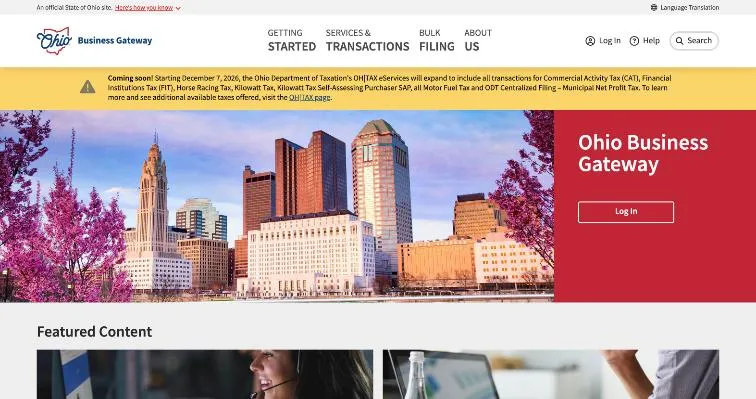
The December 7, 2026 date comes from a banner on the Gateway home page. It says OH|TAX eServices will expand to include all transactions for CAT, the financial institutions tax, horse racing tax, kilowatt tax, all motor fuel tax, and the Department's centralized filing for municipal net profit tax.
What the move means for your next CAT and net profit filings
- The third-quarter 2026 CAT return, due November 10, 2026, is filed on the Gateway.
- The fourth-quarter 2026 CAT return, due February 10, 2027, falls after the move, so plan to file it in OH|TAX eServices.
- A business using centralized municipal net profit filing will file its 2026 annual return, due April 15, 2027 for a calendar year, after the move.
- Telefile for CAT ended March 31, 2026, according to the Department's CAT page, so the electronic portal is the route.
The rules for each tax don't change with the portal. CAT rates, the $6 million exclusion, and due dates are in our Ohio Commercial Activity Tax guide. The centralized filing election and its April 15 deadline are in our guide to Ohio municipal income tax for businesses.
Which Ohio business taxes have moved from the Gateway to OH|TAX eServices?
Sales and use tax and employer withholding moved first, on December 9, 2024. That was the second phase of OH|TAX eServices, which had launched for individual and school district income tax. The Gateway's Department of Taxation page now says both are "now on" OH|TAX eServices.
| Date | What happened |
|---|---|
| December 2, 2024 | Multi-factor authentication became an OH|ID login requirement for the Gateway |
| December 9, 2024 | OH|TAX eServices phase two: sales and use tax, employer and school district withholding, public utility excise, natural gas, and adult use cannabis taxes |
| November 12, 2025 | OH|TAX eServices phase three: pass-through entity and fiduciary income tax, IFTA, severance, MELT, and alcoholic beverage taxes |
| March 31, 2026 | Telefile for CAT discontinued |
| December 7, 2026 | Scheduled: CAT, FIT, horse racing, kilowatt-hour, all motor fuel, and centralized municipal net profit tax move to OH|TAX eServices |
OH|TAX eServices also signs you in with OH|ID, so the same username and 2-step verification carry over. What may not carry over is your business access. Gateway roles and approved transactions belong to the Gateway. Before December 7, make sure someone at the company can sign in to OH|TAX eServices for the business, not just to the Gateway.
For sales tax, our Ohio vendor's license guide covers applying and filing UST-1 returns in OH|TAX. For payroll, our Ohio employer withholding registration guide covers the IT 501, IT 941, and school district returns, all in OH|TAX.
Step 1: Create your OH|ID and set up 2-step verification
Each person who will file or view the business's accounts creates their own OH|ID at ohid.ohio.gov. Use an email address you will keep if you leave the company, or a company address that will be passed on properly. Then add password recovery options and 2-step verification under Account Settings.
Keep the account active. The Gateway's OH|ID page says accounts inactive for 400 days are deactivated. An owner who only touches the Gateway once a year for a single filing can run into this.
Step 2: Register the business, or request access to an existing account
Sign in to the Gateway and choose Request Business Access from the Dashboard. Enter the business's FEIN, or the owner's Social Security number for a sole proprietor without one, and pick a role. What happens next depends on whether the number is already on the Gateway.
If the business is new to the Gateway
- The Gateway prompts you to register the FEIN or SSN.
- Enter the company information. Required fields are marked with a red asterisk.
- Registering makes you the primary Filing Administrator for the business account.
Only a representative of the company should register it. The Gateway tells CPAs and their staff not to register a client's business; the owner or an employee creates the account, and the accountant then requests access.
If the business is already registered
- Confirm the account name shown for the FEIN.
- Select the service areas you need, such as a tax type.
- Select the transaction types you need within them.
- Submit. Your request waits under Pending Approval until a Filing Administrator approves it.
If you don't have an FEIN yet, get one first. The tax accounts, the bank, and most vendors will want it. Our EIN service handles the IRS application.
Step 3: Add transaction types and approve other users
A Filing Administrator controls what the business account can do and who can do it. Both jobs start from the Account Access Management icon after sign-in.
- To add a tax, open the Account Transactions tab and move the transaction from Available Transaction Types to Authorized Transaction Types.
- To approve a person, open the Access Approval tab, expand their name under Pending Access Requests, and choose Approve Account Access.
- To change someone later, expand their name under Approved Access Requests and change their role, grant or remove filing access, or deactivate them.
Users are never deleted. A removed or deactivated user stays on the list with an Inactive or Terminated status and can no longer see the account. That history is useful when you later need to show who filed what.
What do the Ohio Business Gateway roles mean?
The Gateway has three roles: Filing Administrator, Filer, and Non-Filer. You choose one when you register a business or request access to it.
| Role | What the Gateway says about it | Who usually holds it |
|---|---|---|
| Filing Administrator | Approves or rejects access requests, manages users, and adds transaction types. The person who registers the business is the primary Filing Administrator. | The owner, plus one trusted officer or manager as a backup |
| Filer | A user role; what the user can submit depends on the transaction types a Filing Administrator approves | A bookkeeper, controller, or outside CPA who files returns |
| Non-Filer | A user role with access limited to what a Filing Administrator approves | Someone who needs to see the account but should not submit |
Give the Filing Administrator role to at least two people inside the company. If the only administrator leaves, nobody can approve new users until the access is restored, and that takes paperwork.
Common Ohio Business Gateway login and access problems
Most Gateway problems are access problems, not password problems. The person can sign in but can't see the business, or can see it but can't file. Here is how the usual cases get fixed.
| Problem | What to do |
|---|---|
| Forgot your username or password, or lost your 2-step device | Use the self-service page at ohid.ohio.gov/forgot-password. It handles username recovery, password resets, and 2-step resets. |
| You can sign in but the business isn't on your dashboard | Request Business Access with the FEIN. A Filing Administrator for the business has to approve you. |
| You see the business but not the tax you need | Request the transaction type from the Access Requests tab, or ask a Filing Administrator to add it to the account. |
| The only Filing Administrator left the company | The Gateway accepts a letter on company letterhead requesting Filing Administrator access. Call the Help Desk for where to send it. |
| Your name or email is wrong | Change it in your OH|ID profile. Job title is the only personal detail changed inside the Gateway. |
| The business's FEIN is wrong or changed | The Department of Taxation reviews FEIN and SSN changes and may ask for documents. Submit a case through the Gateway. |
| Your OH|ID stopped working after a long gap | Accounts inactive for 400 days are deactivated. Contact OH|ID support or the Help Desk. |
What goes in a letterhead request
The Gateway's account management page lists five items: the last four digits of the business's FEIN or SSN, the username of the person who needs access, that person's email address, a short request for Filing Administrator access, and a handwritten signature from a company officer.
Gateway Help Desk
Call 866-OHIO-GOV (866-644-6468), Monday through Friday, 8 a.m. to 5 p.m., except state holidays. The Help Desk connects you with representatives from each agency on the Gateway. Have the FEIN, your OH|ID username, and the name of the transaction ready.
Who must use the Ohio Business Gateway?
Until December 7, 2026, a business has to use the Gateway if it files the CAT or has elected state-administered municipal net profit filing. Some excise taxpayers, such as financial institutions and motor fuel dealers, file there as well.
- CAT taxpayers. The Department's 2026 Small Business Tax Guide says CAT returns and payments must be filed electronically through the Gateway. Only businesses with more than $6 million in Ohio taxable gross receipts register.
- Businesses that made the ORC 718.80 election. They register, file the annual return, pay estimates, and request extensions and refunds through the Gateway's municipal net profit transactions.
- Employers and businesses filing with cities that take returns through the Gateway. ORC 718.051 lets businesses file city net profit returns and report city withholding there. It is an option, not a requirement.
Plenty of small businesses never need the Gateway at all. A new LLC under $6 million in Ohio receipts, collecting sales tax and running payroll, files everything with the state in OH|TAX eServices. City tax still goes to each city's administrator unless the business makes the state election.
How should a business prepare for the December 7, 2026 move?
Start now if your business files the CAT or centralized net profit tax. A few weeks of lead time avoids a missed February return.
- Confirm every person who files has their own OH|ID with working 2-step verification.
- Sign in to OH|TAX eServices at tax.ohio.gov/OHTAX and check whether the business already shows there, for example from sales tax or withholding.
- Download or print CAT and net profit confirmations and payment history from the Gateway for your records.
- Tell your accountant or payroll provider which person at your company will approve their access in the new system.
- Put the February 10, 2027 CAT due date and the April 15, 2027 centralized net profit due date on the calendar, with a note to file in OH|TAX.
Watch the Department's notices on tax.ohio.gov as the date gets closer. The banner says to visit the OH|TAX page to learn more, and details such as how Gateway history carries over may be announced there.
Tax notices, the Gateway, and your statutory agent
The Gateway and OH|TAX accounts carry your business's own mailing address, and routine tax letters go there. Your statutory agent's address is on the Secretary of State record for a different reason: it is where lawsuits and legal papers against the company are delivered.
With our Ohio statutory agent service, state and tax correspondence that reaches us is scanned to your portal the same business day, and a summons is flagged as urgent. Our office at 3416 Erhart Road in Litchfield goes on the state record, so your home address doesn't. We don't file tax returns or manage Gateway or OH|TAX access for clients, and nothing here is tax advice. If you are still forming the company, we can form your Ohio LLC first, and the tax accounts follow once you have the EIN.
Ohio Business Gateway login and account questions
Is my Ohio Business Gateway login the same as my OH|ID?
Yes, you sign in to the Ohio Business Gateway with your OH|ID username and password, plus 2-step verification. The Gateway has no separate username. The same OH|ID also signs you in to OH|TAX eServices and other state websites. Your access to a particular business, though, is granted inside each system by that business's administrator.
Can I still file Ohio sales tax returns on the Ohio Business Gateway?
No, Ohio sales and use tax moved to OH|TAX eServices on December 9, 2024. Vendor's license applications and UST-1 returns are filed there now. The Gateway's Department of Taxation page says sales and use tax is now on OH|TAX eServices. Employer and school district withholding moved on the same date.
When does the Ohio CAT move from the Gateway to OH|TAX eServices?
The Commercial Activity Tax moves to OH|TAX eServices on December 7, 2026, according to a banner on the Gateway home page. All CAT transactions move, along with centralized municipal net profit tax, FIT, and motor fuel taxes. The November 10, 2026 return is filed on the Gateway; the February 10, 2027 return falls after the move.
How do I give my accountant access to our Ohio Business Gateway account?
Have your accountant sign in with their own OH|ID and choose Request Business Access with your FEIN. Then a Filing Administrator at your business approves the request under Account Access Management. Never give the accountant your login. The Gateway prohibits shared accounts, and a shared login records you as the filer.
What if the only Filing Administrator on our Gateway account left the company?
Ask for Filing Administrator access with a letter on company letterhead. The Gateway lists what it must include: the last four digits of the FEIN, the new user's username and email, a short request, and an officer's handwritten signature. Call the Gateway Help Desk at 866-644-6468 to confirm where to send it.
Why does the Gateway say my business is already registered?
Someone already registered your FEIN on the Ohio Business Gateway, for example a former owner, an employee, or whoever set up an earlier tax account. You don't register it twice. Request Business Access instead, and an existing Filing Administrator approves you. If nobody can, use the letterhead request for Filing Administrator access.
What is the Ohio Business Gateway help desk phone number?
The Ohio Business Gateway Help Desk is 866-OHIO-GOV, or 866-644-6468. It is open Monday through Friday, 8 a.m. to 5 p.m., except state holidays. The Help Desk connects callers with representatives from each agency that uses the Gateway. Password and 2-step resets are self-service at ohid.ohio.gov.
Does an OH|ID account expire if I don't use it?
Yes, OH|ID accounts that stay inactive for 400 days are deactivated, according to the Gateway's OH|ID account page. A business owner who signs in once a year can hit that limit. Sign in a few times a year, and keep a second person on the business account as a Filing Administrator.
Can two employees share one Ohio Business Gateway login?
No, the Gateway requires each person to have their own OH|ID and prohibits shared accounts. The 2-step verification method must belong to that one person too. Give each employee their own access and the role they need. That also keeps an accurate record of who filed each return.
Do I need an Ohio Business Gateway account for a new small LLC?
Usually not. A new LLC below $6 million in Ohio taxable gross receipts doesn't register for the CAT. Its sales tax and payroll withholding accounts are in OH|TAX eServices. You would use the Gateway only for a city that takes returns there, or for centralized municipal net profit filing before December 7, 2026.
Can I form an LLC or change my statutory agent on the Ohio Business Gateway?
No, the Ohio Business Gateway handles taxes, not business entity filings. Articles of Organization, statutory agent changes, amendments, and dissolutions are filed with the Ohio Secretary of State, online through Ohio Business Central or on paper forms. The Gateway identifies your business by FEIN, not by its Secretary of State charter number.
Related Ohio guides
Need an Ohio statutory agent?
$49 per business per year. You file the appointment with the Ohio Secretary of State, or we file it for you. We scan documents the same business day, and call if a lawsuit goes unacknowledged.