Ohio business search: how to look up an existing Ohio business
The Ohio Secretary of State's business search, at businesssearch.ohiosos.gov, is a free lookup of every LLC, corporation, nonprofit, partnership, and trade name filed in Ohio. Search by name, number, agent, or organizer, then click Show Details to see the entity type, status, filing date, statutory agent, and filed documents.
What is the Ohio Secretary of State business search?
It is the state's free online index of every business entity and business name on file with the Ohio Secretary of State. It lives at businesssearch.ohiosos.gov. Anyone can use it, and you do not need to own the business you look up. It covers domestic LLCs and corporations, nonprofit corporations, limited partnerships, LLPs, out-of-state companies registered here, and registered trade names and fictitious names.
People land on the same search for three different jobs. This guide covers the first one: looking up a business that already exists and reading what its record says.
- Looking up an existing business, to confirm it is real, active, and spelled the way you think. That is this page.
- Checking whether a new name is free before you file. That is a different test with its own rules, covered in our Ohio business name search guide.
- Finding who accepts lawsuits and legal notices for a company. Our Ohio registered agent search guide covers that lookup and what to do when the agent is gone.
The record is a filing record, not a profile. It shows what someone filed and when. It does not show who owns the business, whether its taxes are paid, or whether it carries insurance. Those gaps are covered further down.
What can you search by in the Ohio business search?
The Search By menu offers six searches: Business Name, Exact Business Name, Prior Business Name, Agent/Registrant, Organizer/Incorporator, and Number Search. Each one answers a slightly different question, so pick the one that matches what you already know.
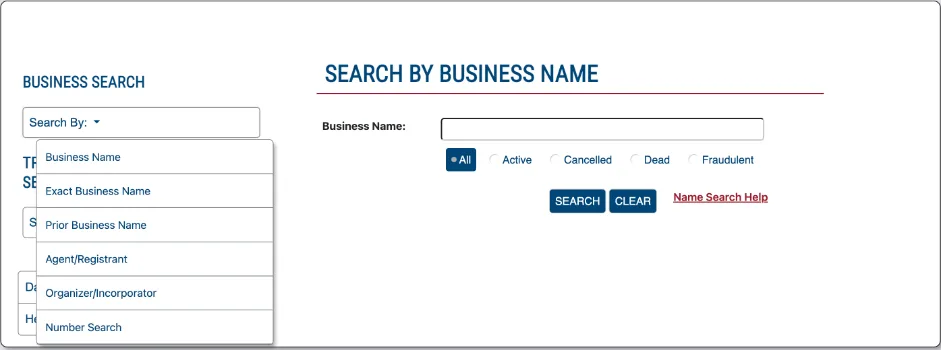
| Search by | Use it when | Tip |
|---|---|---|
| Business Name | You know part of the name from an invoice, sign, or website | Type the distinctive word, not the full name with its ending |
| Exact Business Name | You have the legal name exactly as filed, punctuation included | Fast when it hits; misses on one stray comma or period |
| Prior Business Name | The company may have renamed itself | Finds the record under a name it used before an amendment |
| Agent/Registrant | You want every record that names a particular statutory agent, or the registrant of a trade name or mark | Returns agent appointments and registrations, not ownership; one agent can serve many unrelated companies |
| Organizer/Incorporator | You want the entities a particular person signed articles for | A signer can be an attorney or a filing service, not an owner |
| Number Search | You have the entity number from a certificate, filing, or earlier search | The surest match; the number stays with the entity through name changes |
The Business Name search also has a status filter with five buttons: All, Active, Cancelled, Dead, and Fraudulent. Leave it on All for your first pass, so an inactive record does not hide the history you need.
The entity number is the anchor. The search's Help glossary calls it a unique identifier assigned by the Secretary of State. It goes by three names. Domestic corporations have a charter number, and foreign corporations have a license number. For domestic and foreign LLCs, partnerships, trusts, trade names, fictitious names, name reservations, and marks, it is the registration number. Once you find the right record, write the number down and use Number Search from then on.
Step 1: Gather what you know about the business
Start with the most exact identifier you have. An entity number from a certificate or a filed document beats any name search. After that, the legal name printed on a contract or a check beats the brand name on a truck or a sign.
Look at the paperwork you already hold. Contracts, W-9 forms, lien waivers, and invoices often show the full legal name, including "LLC" or "Inc." A website footer or a map listing usually shows only the brand.
Step 2: Run the search at businesssearch.ohiosos.gov
Open the Ohio Secretary of State Business Search and choose a search type from the Search By menu. If you have the entity number, pick Number Search and skip to Step 3.
For a Business Name search, type the one or two words that make the name distinctive. "Maple Ridge" finds "Maple Ridge Roofing, LLC," "The Maple Ridge Co.," and "Maple Ridge Holdings Ltd." in one pass. Typing the full name with its ending can hide close matches behind a comma or a period. A Name Search Help link sits next to the search button.
Step 3: Pick the right result and click Show Details
The results table lists each match with its entity number, name, type, filing date, expiration date, status, and location by county and state. The expiration date column is blank for most entities. Compare the other columns before you click. Several Ohio businesses can share most of a name, and a cancelled shell can sit right next to the active company you want.
Check the Type column first. It spells out the kind of record, such as "DOMESTIC LIMITED LIABILITY COMPANY" or "CORPORATION FOR PROFIT." A trade name or fictitious name is a name, not a company, and its record points to whoever registered it.
Click Show Details on the record you want. If you are comparing many results, the Export Results CSV and Export Results PDF buttons under the table save the results list.
Step 4: Read the Business Details & Filings window
Show Details opens a window titled Business Details & Filings. The top block gives the entity number, business name, filing type, status, original filing date, and expiration date. The Agent/Registrant Information block gives the agent's name, address, date, and status. For corporations, LLCs, limited partnerships, LLPs, and business and real estate trusts, that name is the statutory agent. For trade names, fictitious names, and marks, it is the registrant.
Below those is the list of filings. Each entry is a document the business or the state put on the record. Typical entries are the original articles, amendments, agent updates, reinstatements, and dissolutions. Where the state has an image of the document, you can open and download it.
Read the documents, not just their titles. The articles show who signed them. An amendment can show a former name. A reinstatement tells you the company was cancelled at some point.
Step 5: Save a dated copy of what you found
Save a screenshot or a PDF of the record and note the date you pulled it. Records change whenever someone files. If you later rely on the record in a contract, a lien, or a lawsuit, you want proof of what it said on that day.
If you need proof that will satisfy a bank, a court, or another state, a screenshot is not enough. Order a certificate or a certified copy from the Secretary of State, as described below.
What does an Ohio business record show?
An Ohio business record shows the legal name, entity number, filing type, status, original filing date, expiration date, statutory agent, and every filing since. The table explains what each item tells you about a company you are about to deal with.
| Item | What it tells you | What to watch for |
|---|---|---|
| Business name | The exact legal name the entity uses in contracts and lawsuits | A mismatch with your invoice may mean a trade name or a different company |
| Entity # | The state's permanent ID for the record | Two records with the same name but different numbers are different entities |
| Filing type | Domestic or foreign LLC, for-profit or nonprofit corporation, partnership, trade name, or fictitious name | A foreign entity was formed in another state; its home state keeps its main record |
| Original filing date | When the articles or registration were filed | A company that claims 20 years of experience may have formed last month |
| Exp. date | Blank for most entities | If a date is filled in, open the filings to see what it refers to |
| Status | Active, Hold, Canceled, or Dead, as the Secretary of State defines them | Anything other than Active deserves a look at the last filing |
| Agent/Registrant | The statutory agent for an entity, or the registrant for a trade name or mark | An agent appointed with the original articles and never updated may be stale |
| Filings | Every document filed, with images where available | Amendments, name changes, cancellations, and reinstatements |
ORC 1706.16(C) puts a useful limit on all of this. For an LLC, filed articles are notice of the name, the agent, and the agent's acceptance, "but not notice of any other fact." Anything else written in the articles is information, not a representation the state has checked.
What do Active, Hold, Cancelled, and Dead mean on an Ohio business record?
The search's Help glossary says the status "will be either active, hold, canceled or dead," as the Secretary of State defines them. The table gives the glossary's definitions. The name-search filter buttons spell one of them "Cancelled" and add a Fraudulent option.
| Status | Secretary of State definition | Is the name protected? |
|---|---|---|
| Active | On record as actively engaged in business | Yes, if the business is the type to have name protection |
| Hold | Canceled for failure to comply with a legal requirement | Yes, for 1 year after cancellation |
| Canceled | Canceled by a Secretary of State | No |
| Dead | No longer engaging in business following a voluntary dissolution by the business | No |
Active
Active is a filing status, not a credit check. It does not mean the business is current on taxes or reachable. Ohio LLCs and for-profit corporations file no annual report. A company that quietly stopped operating can stay active until someone files to end it.
Hold
Hold marks a cancellation for failing a legal requirement, and the name stays protected for a year. Keeping a statutory agent is one such requirement. If an LLC's agent lapses and the default is not cured within 30 days of the state's notice, its articles are canceled (ORC 1706.09(L)). Corporations face the same rule under ORC 1701.07(M). Our Ohio LLC reinstatement guide explains how to come back.
Canceled
The Secretary of State canceled the record, and the name is no longer protected. Someone else can file under it. Open the last filing to see why the record ended.
Dead
Dead means the business dissolved voluntarily and is on file as no longer engaging in business. Owners end an entity by filing a certificate of dissolution, with a $50 state fee (ORC 111.16(N)). A company that dissolved recently can still be winding up its affairs, so Dead does not mean every debt or contract is settled.
Fraudulent
The status filter also includes Fraudulent, which the Help glossary does not define. If a record you are relying on carries that label, stop and contact the Secretary of State before you act on anything the record says. The business services line on its fee schedule is 614-466-3910.
How do you get copies and certified copies of Ohio business filings?
For most purposes, the free document images in the filings list are enough. Open the filing and download the PDF. That gives you the articles, amendments, and agent updates as the state imaged them.
A certified copy is different. The Secretary of State certifies it under its seal as a true copy of what is on file. Banks, courts, title companies, and foreign governments ask for one when a plain printout will not do. Order it through the Secretary of State's filing portal, Ohio Business Central (ohiobusinesscentral.gov, which opens bsportal.ohiosos.gov). Its menu has a Certified Copy option, and ordering a certified copy online requires a Business Central profile.
ORC 111.16(K)(1) sets the ceiling on what the office may charge. Copies of filed papers cost no more than $1 per page, and creating and affixing the office's seal to a certificate costs $5. Check the total in the portal before you pay.
If what you really need is proof the company exists and is active, order a certificate of good standing instead. The Business Details & Filings window has a button to buy one. Ohio also calls it a full force and effect certificate or a certificate of registration. The state fee is $5. Our Ohio certificate of good standing guide walks through ordering it, or we can order it for you. A document headed for another country may also need an apostille.
What can't the Ohio business search tell you?
The search cannot tell you who owns an LLC. Ohio articles of organization must state the LLC's name and its statutory agent with the agent's signed acceptance (ORC 1706.16(A)). Member names are not required, and most filings leave them out. Our guide to finding the owner of an Ohio LLC lists the records that sometimes do show who is behind a company.
Other things the Secretary of State's business record does not cover:
- Liens and secured loans. A lender's financing statement is a UCC filing, searched separately. Our Ohio UCC search guide covers it.
- Taxes. Sales tax, withholding, and the commercial activity tax are accounts with the Ohio Department of Taxation, not the Secretary of State.
- Lawsuits and judgments. Those are court records, kept by the court where the case was filed.
- Real estate. Deeds and mortgages are recorded with the county recorder (ORC 317.08), and property ownership is searchable on county auditor sites.
- Licenses. Contractor, professional, and trade licenses come from the licensing board or city that issued them.
- Sole proprietors and general partnerships that never filed anything. They have no entity record unless they registered a trade name or fictitious name.
Why doesn't a business show up in the Ohio business search?
Most "missing" businesses are a search problem, not a missing record. Work through these in order before you conclude a company does not exist in Ohio.
Punctuation and spacing
Commas, periods, ampersands, and apostrophes trip up exact searches. "J&M," "J & M," and "J and M" can each be written differently on the record. Switch from Exact Business Name to Business Name, search the distinctive word alone, then try the variations.
Endings and designators
Leave off "LLC," "L.L.C.," "Ltd.," "Inc.," "Co.," and "Corporation." A business you know as "Smith Roofing LLC" may be on the record as "Smith Roofing, L.L.C." or "Smith Roofing Company."
A brand name instead of the legal name
The name on the truck may be a trade name or fictitious name owned by a company with a different legal name. Search the brand to find the name registration, then follow it to the registrant. ORC 1329.01 requires each registration to list the applicant's name and business address.
A name change or a status filter
If the business renamed itself, run a Prior Business Name search. Also check the status filter: a search limited to Active hides every cancelled and dead record.
It ended before 1973
The Secretary of State's Data and Image Information page says filings were kept by hand before 1973. Businesses from before 1973 were entered into the computer system only if they were still active. A company that ended before then may not appear online at all.
It was never registered in Ohio
Sole proprietors do not form an entity, and an out-of-state company may never have registered here. For the second case, search the company's home state as well. Our Ohio foreign LLC registration guide explains when an out-of-state LLC has to register.
Why should you look up your own business?
Because nobody else will tell you when your record goes wrong. Look up your own company once a year and after any change. Confirm the legal name, the active status, and the agent's name and address, and read the filings list for anything you did not file.
The Business Details & Filings window offers a Business ID Theft e-mail notification sign-up for exactly this reason. It is worth turning on for any company you own.
The agent line matters most. When an LLC's agent lapses, the Secretary of State sends notice by mail or e-mail. The LLC then has 30 days to cure before cancellation (ORC 1706.09(L)). If your agent has moved or resigned, a Statutory Agent Update is a $25 filing. Naming an Ohio statutory agent with a staffed office also keeps your home address off the record that everyone else is searching.
Ohio business search and business record questions
Is the Ohio Secretary of State business search free to use?
Yes, searching the Ohio Secretary of State Business Search online is free, and anyone can look up any business. You pay only for official documents. Under ORC 111.16(K)(1), copies of filed papers cost no more than $1 a page, and the seal on a certificate is $5.
Can I search the Ohio business database by an owner's name?
Not for LLC owners. Ohio articles of organization do not have to name members or managers (ORC 1706.16(A)), so there is no owner search. The Agent/Registrant and Organizer/Incorporator searches find people who signed or accepted filings. Those people are often, but not always, owners.
What is a charter number on an Ohio business record?
It is the entity number the Ohio Secretary of State assigns to a domestic corporation, shown as Entity # in the search. The same identifier is called a license number for a foreign corporation. For LLCs, partnerships, trusts, trade names, and fictitious names, it is a registration number. Number Search is the surest way back to the same record.
Does an active status in the Ohio business search mean the company is legitimate?
No, Active means the business is on record as actively engaged in business, which is a filing status. Ohio LLCs file no annual report, so a dormant company can stay active for years. Check the filing date, the agent, and the filings list. Then ask for a certificate of good standing, references, insurance, and licenses.
How do I get a certified copy of an Ohio LLC's articles of organization?
Order it through Ohio Business Central, the Secretary of State's filing portal. Ordering a certified copy online requires a Business Central profile. Have the entity number and the filing you want. ORC 111.16(K)(1) caps copy charges at $1 a page and sets $5 for the office's seal on a certificate.
Does the Ohio business search show whether a company owes taxes?
No, the business search is a Secretary of State filing record. Tax accounts are kept by the Ohio Department of Taxation and by city tax offices. An active status says nothing about tax compliance. For a business purchase, ask the seller for tax clearance letters and have your attorney or accountant review them.
Does the Ohio business search show liens or loans against a business?
No, liens on business assets are UCC financing statements, kept in the Secretary of State's separate UCC records. Search those by the debtor's exact legal name. Mortgages and federal tax liens are recorded with the county recorder, and judgments are in court records.
Why can't I find a sole proprietor in the Ohio business search?
A sole proprietor does not form an entity, so there is no entity record to find. The only Secretary of State record a sole proprietor usually has is a trade name or fictitious name filed under ORC 1329.01. Search the brand name; the registration lists the owner's name and business address.
Do cancelled Ohio businesses still appear in the business search?
Yes, ending an entity does not remove its record. Set the status filter to All, Cancelled, or Dead and the record appears with its status and filing history. The exception is a business that ended before 1973, since only still-active pre-1973 businesses were entered into the computer system. The Secretary of State also publishes downloadable reports of cancelled and dissolved entities.
Can I download Ohio business search results as a spreadsheet?
Yes, the results page has Export Results CSV and Export Results PDF buttons under the table, and they save the results list. For bulk lists of new or cancelled entities, use the Secretary of State's downloadable monthly business reports instead.
Related Ohio guides
Need an Ohio statutory agent?
$49 per business per year. You file the appointment with the Ohio Secretary of State, or we file it for you. We scan documents the same business day, and call if a lawsuit goes unacknowledged.